
Appointment-booking app for cosmeticians — a management system for beauty salons, appointments, and customers
A smart salon management system that lets you focus on what really matters — the beauty and the service for your customers

The challenges you face
We understand the day-to-day difficulties of beauticians and beauty salon managers
Complicated appointment management
Coordinating appointments over WhatsApp and phone, difficulty managing cancellations and scheduling treatments
Losing customers
Difficulty remembering preferences and history, and following up on customers who haven't come in a long time
Treatment tracking
Difficulty documenting treatments, recommended products, and results
Cumbersome invoices
Preparing invoices manually, tracking payments, and using a paper ledger card
How BaseCRM solves it
Advanced solutions tailored specifically to your needs in the beauty business
Clients book their own appointments — even at 11pm
You send one link on WhatsApp or put it on Instagram, and the client picks a treatment, sees only the times genuinely free in your calendar, and books — no app, no sign-up, no phone call. The appointment lands straight in the calendar, and she gets a confirmation email with a self-cancellation link.
- A personal link for the business — on WhatsApp, Instagram or your website
- Only genuinely free times, based on the working days and hours you defined
- Email confirmation to the client and to you, with self-service cancellation

A smart digital appointment board
Full digital appointment management with automatic email reminders to customers. The system detects conflicts, makes it easy to reschedule, and gives a clear picture of the daily and weekly schedule. Option to set recurring appointments and manage a waiting list.
- Automatic email reminders + WhatsApp sharing
- Clash detection — by treatment room too
- Recurring appointments, and a waiting list that suggests who to offer a freed-up slot to

A full digital customer card
All of the client’s appointments in one place: the treatment, date and time, payment status and a description you add to each treatment. Beside it, her contact details, conversation history, tasks, and the files and documents you attached — all one click away.
- A full treatment history
- A description for each treatment, and fields of your own on the card
- Before/after photos

Fast treatment documentation
For each treatment type you define a summary template, and it fills in the summary when you open it — skin type, what was done, the skin’s reaction and care recommendations. Fill it in during or right after the treatment, or dictate it. The summary is saved on the appointment and stays in the client’s history.
- Recording templates for every treatment type
- Voice dictation of the summary
- A summary saved on the appointment and kept in the history

Invoices and a digital customer ledger
Issuing Digital invoices tax invoices/receipts at the click of a button, payment tracking, and customer-ledger management. Sending to customers by email. The system keeps a full financial history and lets you export reports.
- Invoices and a customer ledger
- Tracking payments and balances
- Card payment, instalments or a standing order — on the plan with card payments

Product stock — what is on the shelf and what to reorder
All of the salon's products in one place, for treatments and for sale: how much is in stock — in units, ml or grams — the manufacturer and the price. A product that drops below its minimum is marked "Needs restocking" and an alert is sent, and a product linked to a service in the catalogue comes off the stock when an invoice is issued. An existing product list comes in from an Excel file, with a preview before the import.
- Search by name, manufacturer, SKU or barcode
- Low-stock alerts
- Excel import with a preview
Receiving goods from the supplier's invoice
When a delivery arrives, the supplier's invoice or delivery note is typed in — products, quantities, price and discount — and the stock updates. Each product's cost is worked out as the average of what was paid for it, and the product card shows the recent purchases. After receiving, the system offers to record the supplier's invoice as an expense too, in a form that is already filled in.
- Receive by supplier invoice or delivery note
- Average cost for every product
- Recording the invoice as an expense, in a form already filled in

A customer club that brings customers back
A customer club inside the system that already runs the salon: customers join with a link, a QR code or a box on the online booking page, get a join benefit, and in their birthday month the benefit goes out to them by e-mail on its own. Offers to club members, or to anyone who has not visited for a long time, are sent gradually, and each customer’s personal code is closed on the invoice.
- An automatic birthday benefit, never on Shabbat or holidays
- Separate consent for email and WhatsApp, with a record
- A personal coupon redeemed on the invoice

Here's how it looks in real life
Screenshots from a sample business — a beauty salon: appointment calendar, recurring appointments, waiting list and client cards

Monthly appointment calendar
Monthly view of all treatments — by client and time

Appointment list
Every appointment — treatment, status and payment

Customer list
Client cards — regular or new, including outstanding balance

Recurring appointments
Set a fixed monthly appointment — the system schedules it automatically

Waiting list
Clients waiting for an open slot in the popular treatment
The whole clinic in the palm of your hand
Appointment calendar, client cards and the waiting list — from the phone, between treatments.
- Add an appointment in one click
- Automatic email reminder to the customer
- Treatment history in the customer card
- Share the appointment on WhatsApp in a click


Key features for beauty businesses
Everything you need to run a professional, efficient beauty salon
Self-service booking
One link for clients — they choose a treatment and a free time and book on their own, around the clock.
Smart waiting list New
An appointment falls through? The system immediately shows which client on the waiting list fits the slot, and books her in one click.
Voice transcription for appointments New
Recording or dictating notes after a treatment automatically turns into organized text linked to the customer card. Saves documentation work.
Automatic receipt scanning New
Snap a photo of a receipt — and the system automatically fills in the amount, date, vendor, and expense description. Saves manual data entry.
Landing page for your business New
Built-in landing page builder — slogan, gallery, testimonials, and a lead form. A short URL to share on WhatsApp and social.
Advanced appointment management
An interactive appointment board with reminders
Customer management
A digital customer card with all the information
Treatment documentation
A summary for every treatment, from a template per treatment type
Photo gallery
Before/after photos for every customer
Invoicing system
Invoices and a digital customer ledger
Smart reminders
Automatic email reminders + WhatsApp sharing
Product stock
Low-stock alerts and receiving goods from the supplier's invoice. A service linked to a product comes off the stock when an invoice is issued.
Courses and workshops New
A make-up course or a skincare workshop: a group with dates, a price and a registration link, beside the regular appointments. Switched on in the settings.
Online payments New
A payment link on the invoice — by card or in instalments — and a recurring charge to a saved card. On the plan with card payments.
Information security
An encrypted connection (HTTPS), daily backups and an encrypted backup copy kept off the server. Only people you invite can get into the business.
Customer loyalty club
A join page with a QR code, an automatic birthday benefit and offers to club members.
Access from mobile devices
Work from any device, anytime
One price for the whole business
Everything you need to run a professional beauty salon at one simple price
Full plan for the whole business
No credit card needed. When the free month ends: ₪29 a month for the whole business.
No credit card, no commitment
No hidden costs • cancel anytime
Need to take card payments from customers? Plan with card payments: ₪89 a month (terminal fees and commissions paid to the payment company separately).
- An advanced appointment board with automatic reminders
- Everything Base does, except card payments
- Full treatment documentation
- Invoicing and customer-ledger system
- Photo gallery
- Product stock with a low-stock alert
- Support in Hebrew and English
- Access from mobile devices
No credit card required
How do you get started?
Sign up free
Sign up in under a minute, no credit card required
Setting up treatments
Define treatment types, durations, and prices
Appointment management
Customers book appointments and receive automatic reminders
Invoices and tracking
Issue invoices and track revenue and returning customers
Frequently asked questions
What is appointment management software for a cosmetician?
How do you run a beauty salon professionally?
Does the system send reminders to customers?
Can the salon's product stock be managed in the system?
How much does beauty salon management software cost?
Guides for cosmeticians and beauty clinics
Professional content for running a successful beauty salon
A typical day for a beautician with BaseCRM
This is what smart beauty-salon management looks like — no notebooks, no WhatsApp
08:00 — Morning
You open the dashboard and see all of today's appointments. A client cancelled? The slot frees up automatically.
10:00 — Treatments
Before each treatment, you check the client's card — what she had last time, allergies, preferences.
15:00 — Invoices
You issue a tax invoice straight from the client's card, with an allocation number from the Tax Authority where required.
18:00 — Reminders
The system sends automatic reminders to tomorrow's clients. You close out the day with peace of mind.
Guides for beauty-salon owners
CRM guide for beauty salons
How to choose a management system that fits your beauty salon — what to look for and what to avoid
Digital appointment-management guide
Why to switch from a paper diary to a digital system, and how much time it saves
Customer-retention strategies
How to get clients coming back again and again — practical tips
Recently added
What reached the system in the last few weeks · All updates
Team calendar — a column for each staff member New
Once staff are defined, the calendar shows the day in columns, one per staff member, with the hours someone does not work shaded. Click a free slot to book with that person, and drag an appointment to another column to move it.
Several services in one visit New
A customer coming for several services is booked as one visit — online booking included. One reminder goes out, and confirming or cancelling applies to the whole visit.
Approval for appointments booked online New
You can choose to have appointments booked from the public page wait for approval: the slot is held, the customer gets an email about the request and about the approval or decline, and the reminder goes out only after approval.
Confirm arrival or "I can't come" from the reminder New
The reminder email carries a link: confirm arrival, or write "I can't come" with a reason — the appointment is cancelled and the slot frees up at once. The business is notified, and the reason is emailed to the business owner only.
Automatic follow-up rules New
Three rules you switch on in settings: a new lead — a task to call them today; a lead who booked an appointment — moves to the stage you choose; an appointment cancelled or missed — a task to get back to the customer.
A summary for the customer after an appointment New
Every appointment has room for a summary written for the customer, separate from the internal notes. Send it on WhatsApp or by email, and it appears in the customer's personal area — next to upcoming appointments and earlier summaries.
Sales from your previous system New
Moving from other software? Import past years' sales lines from an Excel or CSV file and see them in a report by month, customer or service. They are kept for reference only: no document is issued and no revenue is counted.
Permissions for each staff member New
When inviting a staff member, pick a ready-made role — staff, staff who see only their own, front desk and billing, or view only — or customise: for each area of the system no access, view or edit, and separately whether they see amounts, export and delete. Someone who does not see money sees no amount, on any screen.
Requests to reschedule or cancel, with your approval New
Two switches in settings, each on its own: on the appointment's personal link the customer picks a free time from your booking hours and asks to move, or sends a cancellation request with a reason. The appointment stays where it is until you approve or reject on its page, and the customer gets the answer by email. Approving a move shifts every service of the visit, and a time taken in the meantime is not approved.
A consultation recorded and transcribed — every preference and sensitivity is kept
Record a full consultation, up to 90 minutes, and get a transcript attached to the appointment — what the client asked for, what they avoid and what was planned.
- A consultation before a new treatment
- A conversation about sensitivities and preferences
- Planning a series of treatments
-
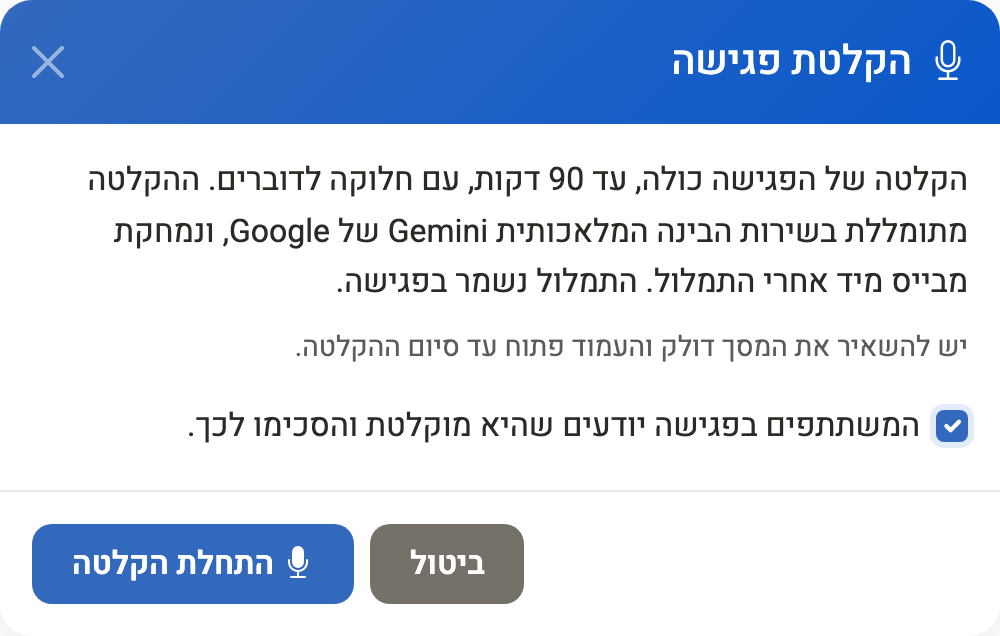
Consent before anything else
Before recording, the participants confirm the meeting is being recorded. Without that confirmation, recording does not start.
-
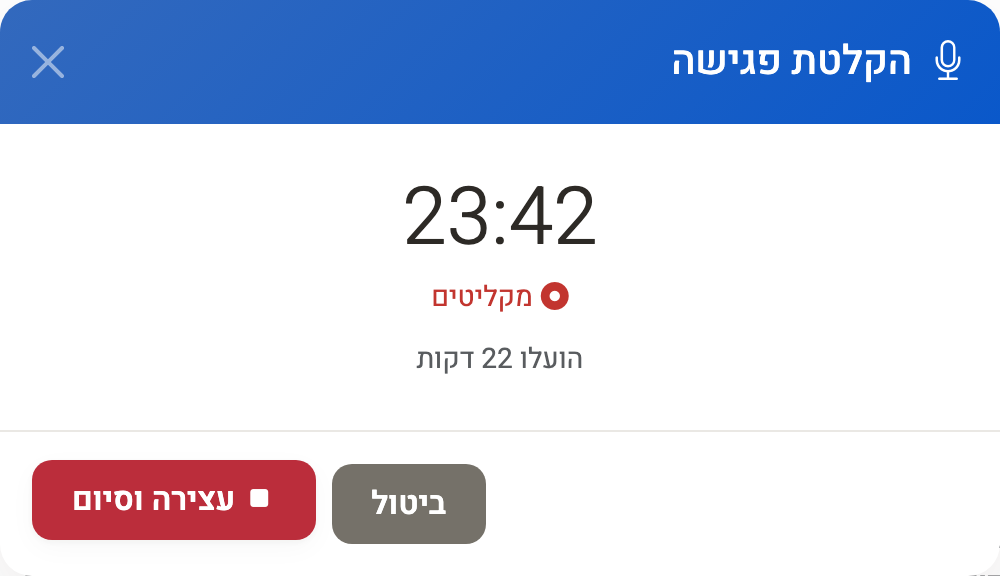
Record up to 90 minutes
On the appointment, choose “Record the meeting + transcript”, from the phone or the computer. The recording uploads in parts during the meeting.
-
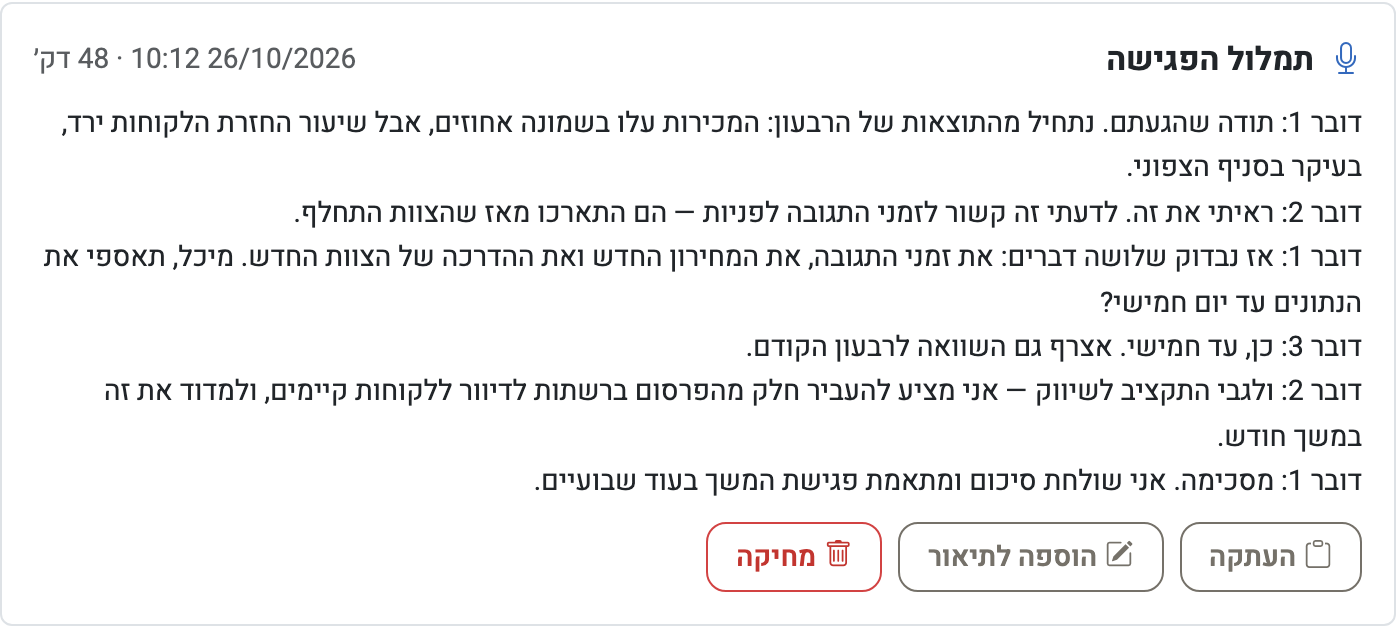
The transcript arrives on the appointment
Usually within a few minutes of the end, with a notification. Copy it or add it to the appointment description with one click.


- The recording is transcribed by Google’s Gemini AI service. In a clinic it is transcribed only on BaseCRM’s transcription server and is not sent to external AI services.
- The audio is deleted right after transcription. The transcript is stored encrypted, and everyone authorised to see the appointment can read it.
- The transcript is split by speaker: “Speaker 1”, “Speaker 2” and so on.
The transcript usually appears within a few minutes after the recording ends, and a notification is sent when it is ready.
Join the beauty businesses already running their business with Base
Start managing your beauty salon professionally — free, in Hebrew, in a minute
Start free