
An app for fitness coaches — managing trainees, workout programs and progress tracking
For studio owners, personal trainers and gym coaches — manage all your trainees, workout programs and measurements in one place. Simple, smart and professional.

The challenges of managing training
We understand the difficulties of working as a personal trainer
Manual progress tracking
Recording measurements and results on paper or in Excel, difficulty seeing the trainee's progress over time
Scattered workout programs
Difficulty managing different workout programs for different trainees, cumbersome manual updates
Manage the schedule
Handling training sessions via WhatsApp and email, difficulty tracking cancellations and changes
Lack of insights
Difficulty showing trainees their progress and motivating them to keep going
How BaseCRM solves it
Solutions tailored for professional personal trainers
Digital workout programs
Create and manage personalised workout programmes for each trainee. A built-in exercise library, and your own exercises with a link to a demo video. Programmes reach trainees in the app or by link.
- Create personalized programs
- A built-in exercise library plus your own exercises
- Easy sharing with trainees

Progress tracking and measurements
Ongoing measurement logging: weight, body fat, circumferences and strength performance. Every trainee's measurements are kept by date, and every metric measured at least twice gets a progress chart. Progress photos are uploaded from the phone or taken straight from the screen, and before and after are shown side by side.
- Comprehensive measurement logging
- Measurement history by date
- A progress chart for every metric
- Progress photo gallery

Smart schedule
A digital training calendar with automatic reminders for trainees. Week, month and day views, and a status for every session: scheduled, held, cancelled or no-show. You see clearly where you are available and where there are gaps.
- Quick and easy session scheduling
- Automatic reminders
- A status for every session

Centralized trainee management
A digital card for every trainee: contact details, the active training program and its progress, notes from sessions, appointments, interactions, open debt and agreements. All on one page.
- Detailed trainee profile
- Full history for every trainee
- Open debt and agreements on the card
Group training with a registration link
Beside personal training, a group workout or class can be opened with a fixed day and time, and its sessions appear on the class schedule by themselves. Trainees sign up from a registration link, attendance is marked at every session, and the punch card goes down by itself. Under "Payments and debts" you see for every month who paid and who did not, and each trainee can be sent a personal link over WhatsApp — payments, punch cards, sessions and attendance.
- A registration link for the group workout
- Attendance marking, and a punch card that goes down by itself
- A personal area for every trainee, by link

Here's how it looks in real life
Screenshots from a sample business — a personal trainer: plans, measurements and progress tracking

Active training programs
The program list for all trainees — status, duration, trainee and a view link

Program builder with exercises
Build a program by training day, from a built-in exercise library, with sets and warm-up

Workout performance tracking
Every workout the trainee completed — completion rates, notes and workout times

Body measurements and progress
Weight, body-fat percentage, measurements and performance metrics — the full history for every trainee

Exercise library
Built-in exercises + custom exercises — by category and level

Progress gallery
Before/After photos for every trainee — organized by date
Clients open a personal page on their phone — not a PDF
With one click your client gets a link to a personal page on their phone — they see every training day, exercise, set and weight, tick off the sets they did, and the history is saved automatically.
- No download — opens directly in the mobile browser
- Share with one click — WhatsApp or email
- Automatic logging of every completed set
- Automatic rest timer between sets
- The trainer sees the progress in real time too


Key features for fitness trainers
Everything you need for professional trainee management
Voice transcription for training sessions New
Recording or dictating notes after a session is automatically turned into organized text and linked to the trainee's profile. Saves documentation work.
Automatic receipt scanning New
Snap a photo of a receipt — and the system automatically fills in the amount, date, vendor, and expense description. Saves manual data entry.
Landing page for your business New
Built-in landing page builder — slogan, gallery, testimonials, and a lead form. A short URL to share on WhatsApp and social.
Training programs
Creating and sharing personalized plans
Progress tracking
Measurements, graphs and Before/After photos
Training schedule
Time management with automatic reminders
Trainee management
A detailed profile for every trainee with all the information
Photo gallery
Visual documentation of progress
Customer loyalty club
Joining by link, a birthday benefit and offers by email — switched on in the settings
Packages and payments
Managing package sales and payment tracking
Reports and analytics
Insights on performance and revenue
App for trainees
Trainees get access to plans
One price for the whole business
Professional management at a price everyone can afford
Full plan for the whole business
No credit card needed. When the free month ends: ₪29 a month for the whole business.
No credit card, no commitment
No hidden costs • cancel anytime
Need to take card payments from customers? Plan with card payments: ₪89 a month (terminal fees and commissions paid to the payment company separately).
- Digital workout programs
- Measurement and progress tracking
- Training schedule with reminders
- Photo gallery
- App for trainees
- Package and payment management
- Support in Hebrew and English
No credit card required
How do you get started?
Sign up free
Sign up for a free account in under a minute, no credit card required
Setting up your training profile
Define training types, plans and rates
Adding trainees
Add trainees with contact details, measurements and training plans
Manage and track
Manage sessions, track progress and issue invoices
A typical day for a personal trainer with BaseCRM
How a trainee management system changes your daily work routine
Without a management system
- 07:00 — Checking WhatsApp, trying to remember who's training today
- 08:00 — A trainee arrives, searching Excel for their training plan
- 10:00 — a trainee cancelled at the last minute, with no notice
- 12:00 — trying to remember who still has not been sent an invoice
- 14:00 — A trainee's measurements — searching for the previous measurements on paper
- 18:00 — Remembering a client hasn't shown up in two weeks, forgetting to follow up
- 20:00 — Spending an hour updating spreadsheets and issuing invoices
With BaseCRM
- 07:00 — Opening the training schedule, seeing who's training today with a ready plan
- 08:00 — A trainee arrives, clicking their profile to see the plan + latest measurements
- 10:00 — The system sent a reminder, the trainee let you know in advance they're not coming
- 12:00 — recurring invoices go out by email on their own, payment tracking in one click
- 14:00 — New measurements → the graph shows impressive progress, a happy trainee
- 18:00 — the attendance list shows that Dana hasn't come for two weeks → send her a message
- 20:00 — Free time! Everything is updated automatically
What changes in day-to-day work
How a trainee management app impacts the business
Guides for fitness trainers
Professional content to help you run your business better
Why switch to a trainee management system?
A comparison of common methods for managing trainees
| Feature | BaseCRM | Excel / Google Sheets | Manual calendar / WhatsApp | Trainerize |
|---|---|---|---|---|
| Trainee and contact management | ✓ Full trainee profile | ✓ Basic spreadsheet | ✗ Not centralized | ✓ Basic |
| Digital workout programs | ✓ Built in | ✗ Not available | ✗ Not available | ✓ Built in |
| Measurement and progress tracking | ✓ Graphs and reports | ✓ Manual | ✗ Not available | ✓ Built in |
| Payment and session-pass management | ✓ Billing and payment tracking | ✓ Manual | ✗ Memory only | ✓ Partial |
| Issuing tax invoices (Israel) | ✓ Software registered with the Israeli Tax Authority | ✗ Not available | ✗ Not available | ✗ Not Israeli |
| Automatic reminders | ✓ Automatic by email | ✗ Not available | ✗ Manual only | ✓ Automatic in-app messages |
| Mobile access | ✓ Mobile-friendly, installed from the browser | ✓ Partial | ✗ Not relevant | ✓ |
| Fully Hebrew interface | ✓ Full Hebrew RTL | ✓ Partial | ✓ | ✗ English only |
| Price | First month free No credit card needed. When the free month ends: ₪29 a month for the whole business. Prices are final — no VAT is added. | ✓ Free | ✓ Free | Free for one client / from $10/month |
An app for trainee management - everything you need to know
An app for personal trainers
An app for fitness trainers lets you run your entire business from your phone — training calendar, trainee profiles, measurement tracking and invoices. BaseCRM is mobile-optimized and gives you full access from anywhere, even in the middle of a session at the gym.
Full guide to apps for fitness trainers →Fitness club management
Gym management software covers memberships, punch cards, a class schedule and attendance tracking. BaseCRM offers gym management with punch cards that go down by themselves at every attendance mark in a class.
Fitness club management guide →A smart management system for fitness trainers
A smart management system for fitness trainers combines automatic email reminders, one-click invoicing, progress tracking and performance reports. It cuts manual work and helps you stay in steady contact with your trainees.
Business automation guide →Invoices for fitness trainers
Issue digital invoices from software registered with the Israeli Tax Authority, directly from the system. One-click invoices, tracking of payments and receivables, and a ready-made VAT report. All in Hebrew and compliant with Israeli law.
Digital invoices guide →A system for managing classes
Trainers who run group workouts, fitness classes or membership series — a class management system handles participant registration, attendance tracking, monthly billing and punch cards. In Base CRM all of these features are included in the full plan.
Class management system guide →Frequently asked questions
What is a trainee management system?
How does software for fitness trainers help run the business?
How much does a CRM system for fitness trainers cost?
Can you manage trainees from your phone?
How do you track trainees' progress?
Is there free software for managing trainees?
What does a digital trainee profile include?
Can you send training plans to trainees through the system?
How is a fixed monthly payment collected from trainees?
How much time does the system save a personal trainer?
Recently added
What reached the system in the last few weeks · All updates
A summary for the customer after an appointment New
Every appointment has room for a summary written for the customer, separate from the internal notes. Send it on WhatsApp or by email, and it appears in the customer's personal area — next to upcoming appointments and earlier summaries.
Confirm arrival or "I can't come" from the reminder New
The reminder email carries a link: confirm arrival, or write "I can't come" with a reason — the appointment is cancelled and the slot frees up at once. The business is notified, and the reason is emailed to the business owner only.
Requests to reschedule or cancel, with your approval New
Two switches in settings, each on its own: on the appointment's personal link the customer picks a free time from your booking hours and asks to move, or sends a cancellation request with a reason. The appointment stays where it is until you approve or reject on its page, and the customer gets the answer by email. Approving a move shifts every service of the visit, and a time taken in the meantime is not approved.
A library of ready-made documents for signature New
"New document" opens a library: a blank document or a ready-made text, with recommendations for your type of business. A service agreement, cancellation policy and payment terms for every business, and by type also, for example, a medical questionnaire, a garage work order or a health declaration for physical activity. The texts are a starting point: complete, edit and check them before use.
Appointment types: what is offered online, and the catalog price New
An appointment type can stay in the calendar and on the appointment form without being offered for online booking. You can also link it to a catalog service: choosing the type fills in the length and the price, and an appointment booked online gets the same price. A price typed by hand is not overwritten, and a change in the catalog does not alter appointments already booked.
A fit meeting with a trainee — recorded and transcribed
Record a full meeting, up to 90 minutes, and get a transcript attached to the appointment — the goals, the injuries and the habits, as they were described.
- An introductory and goals conversation
- Nutrition consultation
- A progress follow-up meeting
-
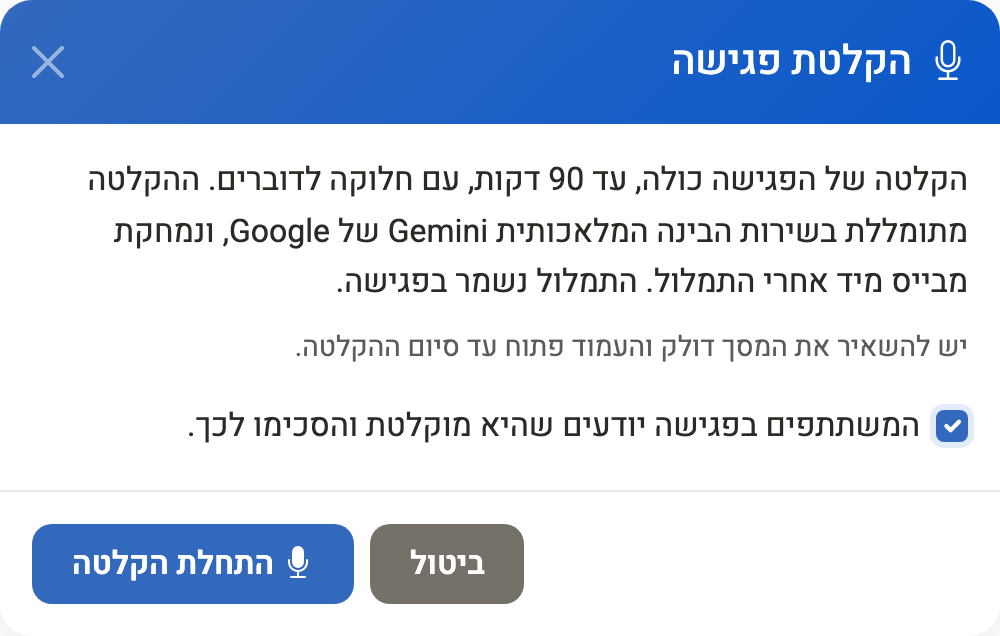
Consent before anything else
Before recording, the participants confirm the meeting is being recorded. Without that confirmation, recording does not start.
-
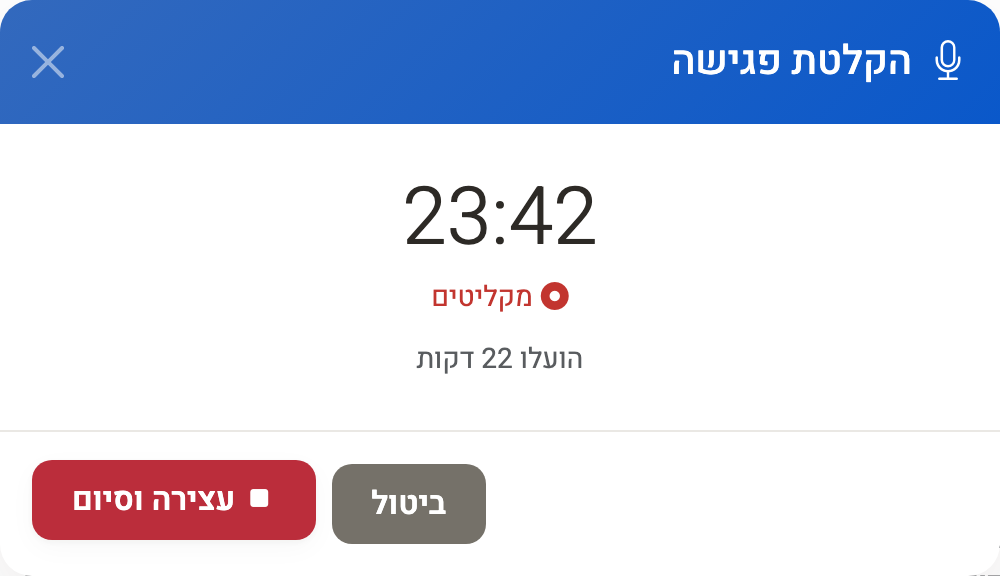
Record up to 90 minutes
On the appointment, choose “Record the meeting + transcript”, from the phone or the computer. The recording uploads in parts during the meeting.
-
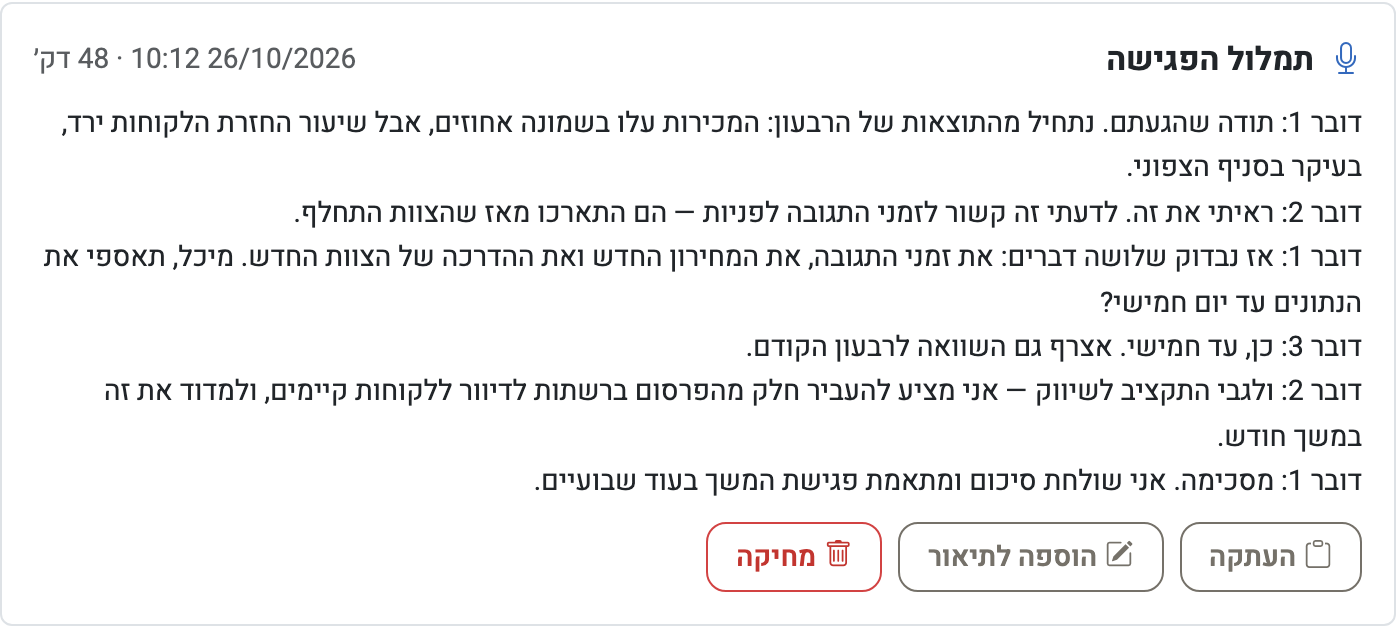
The transcript arrives on the appointment
Usually within a few minutes of the end, with a notification. Copy it or add it to the appointment description with one click.


- The recording is transcribed by Google’s Gemini AI service. In a clinic it is transcribed only on BaseCRM’s transcription server and is not sent to external AI services.
- The audio is deleted right after transcription. The transcript is stored encrypted, and everyone authorised to see the appointment can read it.
- The transcript is split by speaker: “Speaker 1”, “Speaker 2” and so on.
The transcript usually appears within a few minutes after the recording ends, and a notification is sent when it is ready.
Join the hundreds of businesses already signed up to Base
Start managing your trainees professionally today
Sign up